It is possible to change the location for these downloads so that it is in a more obvious location, but I found that even when setting an alternative to the default ‘~/Library/Mail Downloads’ folder, such as the main ‘Downloads’ folder, that these attachments would still download in the default ‘Mail Downloads’ location. The solution to this problem was to delete the ‘Mail Downloads’ folder and create a symbolic link to my preferred ‘Downloads’ folder.
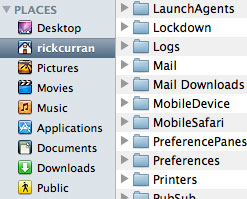 To do this you need to navigate to the ‘Mail Downloads’ folder which you’ll find in your user account folder (the folder with your name and the Home icon), then go into the ‘Library’ folder and you should see the ‘Mail Downloads’ folder. Note: Since OSX 10.7 Lion came out the ‘Library’ folder is hidden by default, to get to it you need to access the ‘Go’ menu in the Finder whilst holding down the alt key.
Next step is to delete this folder and then fire up Terminal on your system – this bit requires a bit of command line entry but it’s fairly straight forward. When you open up Terminal you should end up with a login prompt and you will be located within your user account files on the system, presuming this is the case we can get on with creating the symbolic link!
In the example below I am going to create a symbolic link to the main ‘Downloads’ folder that is used by Safari so that all downloads from either web browsing or email will end up in the same place:
ln -s ~/Downloads "library/Mail Downloads"
If all has gone well you should now find that any attachments you open from emails will now appear in your regular downloads folder instead of the hidden away Mail Downloads folder!
UPDATE: OSX 10.8 Mountain Lion changes the location of the Mail Downloads folder
In OSX 10.8 the “Mail Downloads” folder location has moved to the following location (See this MacOSXHints article for more details):
~/Library/Containers/com.apple.mail/Data/Library/
To apply the above link for OSX 10.8 you will need to use the a different command to create the symbolic link. The first step is to go to the new folder location, I’d recommend doing this via the terminal as you need to run the command from there, go to: ~/Library/Containers/com.apple.mail/Data/Library and delete the existing ‘Mail Downloads’ folder that is in there. Then use the following command to create the symbolic link in this new location:
ln -s ~/Downloads "Mail Downloads"
Once that’s done all your attachments in OSX 10.8 Mountain Lion should now end up in your Downloads folder allowing you to easily keep track of attachment files and avoid them unnecessarily clogging up your hard drive.
@Kevin: Looking into this a bit more it appears that Mail's sandbox in 10.8 prevents apps from opening files that have been downloaded into the symlinked Downloads folder. I'm not sure what – if any – solution there is to this at the moment other than just opening files only from the Downloads folder rather than mail! I'll look into it a bit further though, thanks for the heads up! I had seen this happen but had thought it was just my machine behaving weird!
@Kevin: Yes, you're right, I am actually seeing the same behaviour! I'll take a look and see if I can figure out what's going on!
I tried this tip (with Mountain Lion). It is now definitely putting the attachments in the Downloads folder. However. when I attempt to open the attachment from within the mail message, it launches the associated app (e.g., MS Word, TextEdit, Adobe Reader, etc.) but the app never opens. It bounces up and down in the dock for a while, and then I have to Force Quit the app.
@Sibe: The Library folder is invisible in Lion, perhaps that is part of your problem?
I found this thread not the Apple discussions that might be of use to you:
https://discussions.apple.com/thread/3539938?start=0&tstart=0
pity… does not work in lion, terminal says:
"ln: library/Mail Downloads: No such file or directory"
(OSX 10.7.3)
Yippee! Thanks, great tip.
Buh-bye mail downloads…
-Fifi